
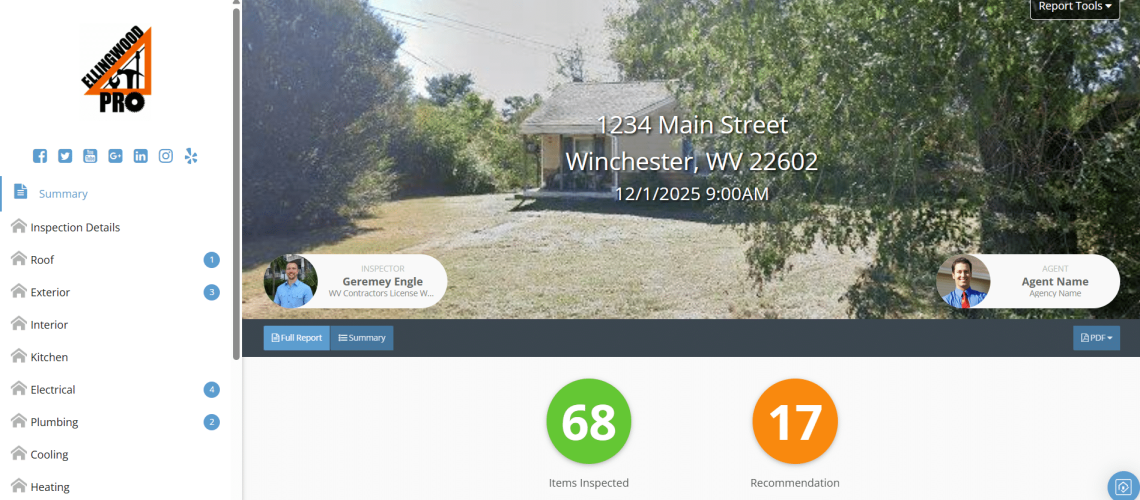
You’ve just received your home inspection report. You open the link, and suddenly your screen fills with photos, arrows, and comments — some in bold red text. Your heart sinks. Did you just buy a lemon? Probably not. But learning how to read your inspection report like a pro can make the difference between panic and peace of mind.
At Ellingwood Pro, we use Spectora software and we’ll reference it throughout as an example. But whether your inspector uses Spectora, HomeGauge, Horizon, or another platform, these principles apply universally. Every home inspection report has the same goal: to give you an honest picture of your home’s condition so you can make confident decisions.
What Does a Home Inspection Report Include?
Think of your inspection report as organized into three layers: identification, summary, and detail. This structure helps you move from a broad overview to specific, actionable insights.
According to the International Association of Certified Home Inspectors (InterNACHI) and the American Society of Home Inspectors (ASHI), inspection reports must document what was inspected, what wasn’t, and any visible defects or safety concerns.
Here’s how most inspection reports are structured:
- Cover & Introduction – Who inspected what, when, and under which standards. This section defines your inspector’s scope and limitations, setting clear expectations from the start.
- Summary Section – Your priority list of issues that matter most for safety, function, or cost. It’s the fast, high-level overview most homeowners read first.
- System Sections – The full story for each component: what’s functioning well, what isn’t, and what may need attention soon. Typical sections include Roof, Structure, Plumbing, Electrical, and HVAC.
- Annotated Photos – Visual documentation of findings with arrows, highlights, and captions to make technical details easy to interpret.
- Recommendations – Specific guidance on whether to repair, replace, or monitor each issue.
In Spectora, these layers are interactive and mobile-friendly. Other platforms organize the same information differently, but the purpose never changes: helping you see what matters most and act on it.
Do All Reports Look the Same?
Not exactly – the content is standardized, but the presentation depends on the software your inspector uses. Here’s how some of the most common systems differ:
- Spectora delivers modern, web-based reports with clickable summaries and color-coded navigation, making it easy to filter findings by severity from any device.
- HomeGauge provides downloadable PDF reports with expandable comment sections and customizable summaries that agents and clients can share easily.
- Horizon by Carson Dunlop emphasizes narrative-style explanations and includes built-in maintenance tips to help homeowners understand and maintain their property.
- Palm-Tech offers a straightforward, checklist-style format that highlights system condition and priority at a glance.
Every platform has its own layout and tools, but all share the same purpose: to communicate findings accurately and help you make informed decisions.
How Should You Read Your Inspection Report Without Getting Overwhelmed?
It’s easy to feel overwhelmed when you first open your report. The secret is reading it strategically.
Start with the Summary Page — your high-level overview. The National Association of Realtors (NAR) recommends focusing on significant safety and system issues before diving into the details.
Most platforms use color codes to guide your attention:
- Red or Orange: safety hazards or major defects
- Blue or Yellow: upkeep or minor repair items
- Gray or Green: informational notes
While many inspection platforms traditionally used color coding, Ellingwood Pro does not categorize findings by color or severity. Instead, we clearly list each defect or observation with photos and recommendations so you can understand exactly what was found without the distraction of labels.
Once you’ve scanned the summary, click into any issue for the full story. Every finding includes:
- Narrative – What’s wrong and why it matters.
- Photo – What the inspector actually saw.
- Recommendation – What to do next.
Use your report’s navigation tools to move between sections — start broad, then zoom in. This method helps you process everything without getting stuck in the details too early.
What Should You Focus On First?
Both InterNACHI and ASHI classify inspection findings into three key priorities:
- Safety Issues – Hazards that could cause injury or damage (exposed wiring, gas leaks, missing handrails).
- Major Defects – Problems that compromise structure or essential systems (foundation cracks, roof leaks, HVAC failures).
- Upkeep Tasks – Normal wear and tear that needs attention to prevent future issues (cracked caulking, loose door hardware).
In Spectora, these appear as defects in the summary view. Other platforms label them differently, but the intent is the same: address safety first, structure second, maintenance last.
If you’re wondering how these categories appear in an actual report, here are a few real examples:
What Does This Look Like in Practice?
- Safety Issue: Exposed 220-volt wiring in garage without protective conduit — immediate electrician evaluation recommended.
- Major Defect: Active roof leak with ceiling staining in master bedroom — roofer inspection within 30 days advised.
- Upkeep Task: Cracked exterior caulking around windows — reseal during next routine upkeep schedule.
These examples show how inspectors communicate severity so you can prioritize calmly and confidently.
How Do You Use the Report for Negotiations and Next Steps?
Your inspection report isn’t just a document — it’s a decision-making tool. Whether you’re buying, selling, or maintaining your home, it guides your next move with facts instead of assumptions.
Ellingwood Pro’s Spectora reports are designed to be easily shared, reviewed, and referenced so you and your agent can create clear, itemized repair lists directly from the report’s findings and photos. This keeps the process flexible and ensures your requests are based on accurate, well-documented information.
If you already own your home, use your report as a maintenance roadmap — a living document that helps you track improvements and prevent costly surprises later.
When major issues surface, take a breath and evaluate with your agent or a trusted contractor. Not every problem is a dealbreaker — but foundation failures, extensive water damage, or multiple system breakdowns often signal deeper concerns worth investigating further. You have options: request repairs, negotiate a price adjustment, or walk away if the issues exceed your comfort or budget.
What Are Common Mistakes Homeowners Make When Reading Inspection Reports?
Avoiding these five pitfalls will make your report far easier to understand and act on:
- Only reading the summary
- Panicking over every issue
- Confusing defects with maintenance
- Ignoring visuals
- Avoiding follow-up questions
If something in your report confuses you, call your inspector — most offer free clarification calls. At Ellingwood Pro, we encourage clients to reach out anytime. Your report is the start of an ongoing conversation, not a final verdict.
How Long Should I Keep My Report?
Save your inspection report permanently. It’s valuable for insurance claims, contractor consultations, and resale documentation.
Digital reports like Spectora allow you to download a PDF version, which you can save permanently with your important home records. Keep this PDF stored securely — whether that’s in your cloud backup or a dedicated home file. Your report is more than a form — it’s part of your home’s documented history.
Why Does Understanding Your Inspection Report Matter?
Understanding your report means understanding your home. The American Society of Home Inspectors (ASHI) notes that homeowners who read and act on their reports reduce long-term repair costs and protect their property value.
When you interpret your report effectively, you can:
- Prioritize repairs intelligently
- Budget with foresight
- Negotiate with confidence
- Approach ownership confidently
Every inspection platform — Spectora, HomeGauge, Horizon, or Palm-Tech — exists for the same reason: to turn complex data into simple, useful insight.
Final Thoughts: From Confusion to Confidence
Your home inspection report isn’t meant to alarm you — it’s meant to empower you. Each section, photo, and recommendation helps you better understand your home and take control of your next steps.
At Ellingwood Pro, we provide clear, same-day inspection reports powered by Spectora, complete with visuals and plain-language explanations. But more importantly, we’re here to help you interpret what it all means.
If you have questions after your inspection, reach out. We’ll help you make sense of every line, every photo, and every recommendation — so you can move forward with confidence.